Configure OVOC Cloud Architecture Mode (WebSocket Tunnel)
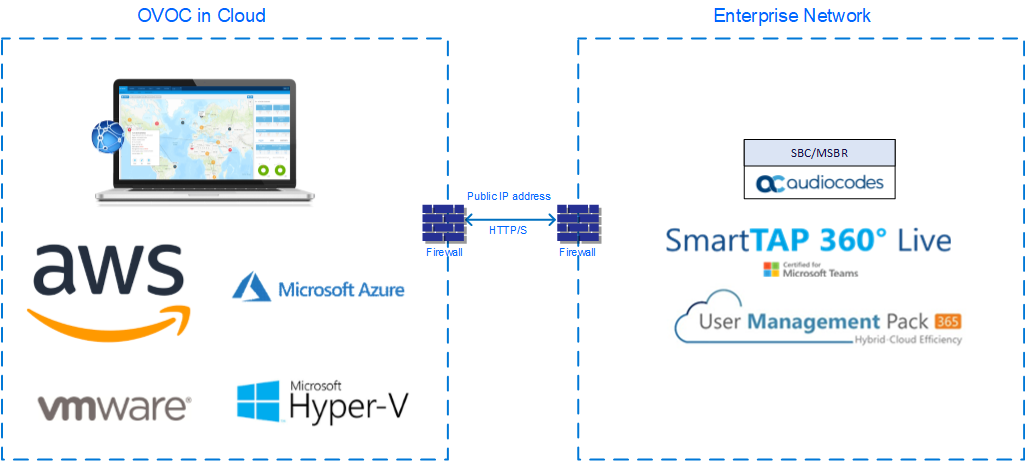
When OVOC is deployed in a public cloud and managed devices are either deployed in the Cloud or in an enterprise network, an automatic mechanism can be enabled to secure the OVOC server > SBC/UMP-365 Management Pack/SmartTAP 360° Live device communication through binding to a dedicated HTTP/S tunnel through a generic WebSocket server connection. This mechanism binds several different port connections including SNMP, HTTP, syslog and debug recording into an HTTP/S tunnel overlay network. This eliminates the need for administrators to manually manage firewall rules for these connections and to lease third-party VPN services. When operating in this mode, Single Sign-on can also be performed from the Devices Page link in the OVOC Web interface to devices deployed behind a NAT. The figure below illustrates the OVOC Cloud Architecture.
Cloud Architecture
|
●
|
This mode is supported on Microsoft Azure, Amazon AWS, VMware and HyperV platforms for all SBC devices Version 7.2.256 and later; SmartTAP Version 5.5 and later and UMP 365 Management Pack Version 8.0.220 and later. |
|
●
|
This mode only supports IPv4 networking. |
This section includes the following: